I’m going to provide you with a surefire way to have an error-free document. Really?
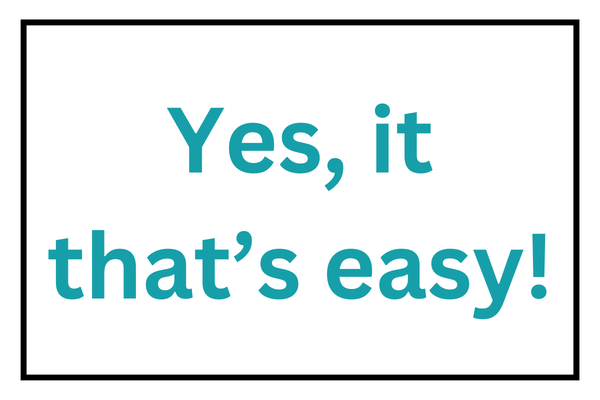
(Did you catch the error above?* I’ll bet many of you didn’t. This is a real typo I’ve seen in a presentation.)
No. Sorry. There isn’t a guaranteed way to prevent all errors in a document.
Editors have many tools to help us hone our clients’ documents. Everybody misses things. Multiple rules and style guides keep us on our toes. For example, everyone has spellings that torment them. Let me be your second set of eyes.
Much of my work involves reviewing business materials, including marketing collateral, newsletters, and white papers, as well as workbooks for authors and consultants who provide training.
What is my competition? Tools like Grammarly. While editing tools can be helpful, they can’t take the place of human editors and proofreaders. Many professionals avoid Grammarly at all costs. I don’t completely shun it, but I’m careful about using it.
I’ll often have Grammarly active in my browser windows. When proofreading blog posts or newsletters, those red underlines indicating errors will catch my eye, causing me to take a closer look at the text.
Just as I look at the food I prepare in my kitchen and don’t take food safety for granted, I also don’t accept all the suggestions an editing tool highlights. Some could be old and moldy.
- There are times when it’s fine to end a sentence with a preposition.
- It’s acceptable to start a sentence with and or but.
- An occasional sentence fragment adds importance to a thought.
Do you have an important sales pitch presentation to give to a potential client? Or maybe it’s a mid-project check-in on completed work and next steps. You want the correct number of zeros in your final report for the additional revenue your client will make. What would catching an extra or missing digit like that be worth to you?
Ready to discuss your options? Fill out my contact form, and I’ll get back to you.
*The image should read “Yes, it’s that easy!” The apostrophe plus s is attached to the wrong word.